

Description
Download Globus Privacy Browser – Secure VPN‑Enabled Web Browser
Overview
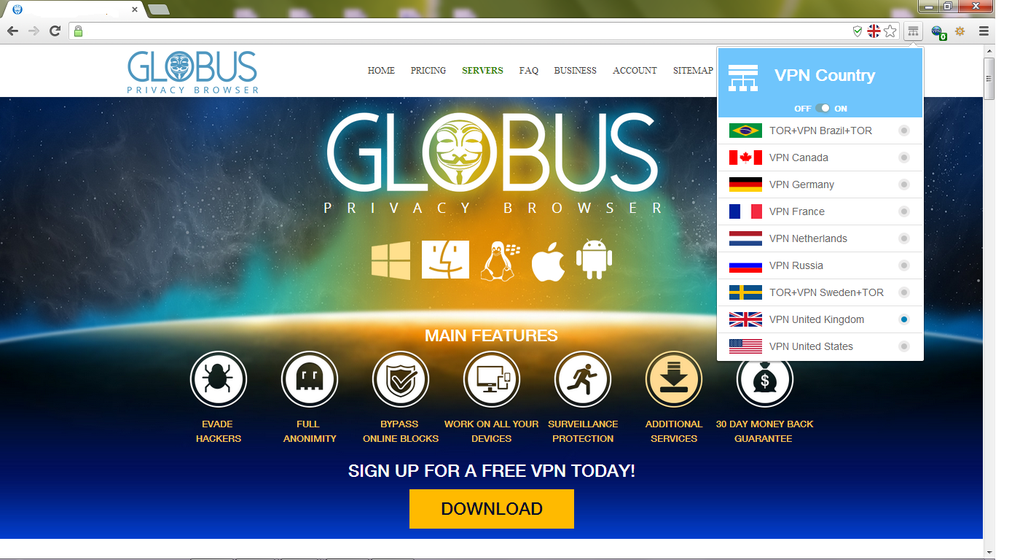
Globus Privacy Browser is a Chromium‑based web browser that comes with an integrated, high‑speed VPN. The idea behind the product is simple yet powerful: give everyday users the ability to browse any website without worrying about geo‑restrictions, surveillance, or data‑theft, and do it without the hassle of installing a separate VPN client. When you launch Globus, the familiar Chrome‑like interface greets you, but a small VPN icon sits to the right of the address bar, ready to route your traffic through encrypted tunnels in a matter of seconds. The built‑in VPN supports dozens of server locations, automatically selects the fastest path, and uses 1028‑bit to 2048‑bit encryption to keep your session private. Because the VPN lives inside the browser, it protects only the traffic that passes through Globus, leaving other applications untouched—a feature that can save bandwidth and improve performance on slower connections. In addition to the VPN, Globus offers standard browsing tools such as tab groups, ad blocking, customizable themes, and a password manager. Its lightweight footprint means it runs smoothly on older hardware while still delivering the speed expected from a modern Chromium engine. Whether you’re a frequent traveler trying to watch streaming services abroad, a remote worker needing a secure connection on public Wi‑Fi, or a privacy‑conscious user who simply wants to keep browsers from leaking data, Globus Privacy Browser promises a “one‑click” solution that removes the need for third‑party extensions or separate VPN subscriptions.
Key Features
- Integrated VPN with 30+ server locations – Switch countries instantly without leaving the browser.
- High‑grade encryption (1028‑bit to 2048‑bit) – Protects login credentials, personal data, and browsing history.
- Chromium foundation – Guarantees compatibility with Chrome extensions, fast page rendering, and frequent security updates.
- Ad‑blocking and anti‑tracking modules – Reduces page load times and blocks invisible trackers.
- Customizable UI – Themes, toolbar placement, and startup options let you tailor the look and feel.
- Lightweight memory usage – Optimized for older PCs, laptops, and mobile devices.
- Cross‑platform sync – Bookmarks, passwords, and preferences sync securely across Windows, macOS, Android, and iOS.
- One‑click toggle – Turn the VPN on or off from the address bar without navigating through menus.
- Automatic server selection – The browser picks the fastest server based on latency and load.
- Privacy‑first policy – No logs are stored; the company claims a strict no‑data‑retention stance.
Installation, Setup & Compatibility
Getting started with Globus Privacy Browser is straightforward. Visit the official website, click the Download button that matches your operating system, and run the installer. Windows users receive an .exe file that guides you through a standard “Next‑Next‑Finish” process, while macOS users download a .dmg package that you drag into the Applications folder. For Android and iOS, the app is available through Google Play and the Apple App Store, respectively. After installation, launch the browser; the first run wizard asks you to choose a default start page, import bookmarks from other browsers, and decide whether the VPN should be enabled by default. The VPN toggle appears as a small shield icon next to the address bar; clicking it opens a panel listing available countries, ping times, and a quick “Connect” button. You can also set the VPN to auto‑connect on startup via the Settings → Privacy menu.
Supported operating systems include Windows 10/11 (64‑bit), macOS 10.14 and later, Android 6.0 or newer, and iOS 12 or newer. The application runs smoothly on low‑end devices because it leverages Chromium’s efficient rendering pipeline and disables unnecessary background services when the VPN is off.
For power users, Globus offers a “Advanced Settings” panel where you can manually select a VPN protocol (OpenVPN or WireGuard), adjust DNS leak protection, and enable a “Kill Switch” that blocks all internet traffic if the VPN connection drops. Regular updates are delivered automatically through the built‑in updater, ensuring you always have the latest security patches and new server locations. The combination of a simple installer, clear setup steps, and broad OS support makes Globus Privacy Browser an accessible choice for anyone looking to add privacy to their daily browsing routine without the complexity of separate VPN software.
Pros, Cons & Frequently Asked Questions
Pros
- All‑in‑one browser and VPN eliminates the need for extra apps.
- Fast connection speeds thanks to automatic server selection.
- Strong encryption protects data on public Wi‑Fi.
- Familiar Chromium UI reduces the learning curve.
- Cross‑platform sync keeps bookmarks and settings consistent.
- Free tier includes unlimited data on most servers.
- Ad‑blocking and anti‑tracking improve page load times.
- Lightweight memory footprint runs well on older hardware.
- Regular automatic updates keep security current.
- No‑log policy enhances privacy confidence.
Cons
- VPN only protects traffic inside the browser, not other apps.
- Free servers may experience occasional congestion during peak hours.
- Limited advanced configuration compared to dedicated VPN clients.
- Some streaming services still detect and block the built‑in VPN.
- Premium subscription required for access to high‑speed “Premium” servers.
FAQ
Is the built‑in VPN really free?
Globus offers a free tier that provides unlimited data on most server locations. However, premium servers with higher speeds and dedicated bandwidth require a paid subscription.
Does the VPN protect my entire device?
No. The VPN encrypts only the traffic that passes through Globus Privacy Browser. Other applications continue to use the device’s default network connection.
Can I use Globus on a corporate network?
Yes, the browser works behind most corporate firewalls, but some enterprises block VPN protocols. In such cases, you may need to enable the “TCP 443” mode in the advanced settings.
How does the “Kill Switch” work?
When enabled, the Kill Switch stops all outbound traffic the moment the VPN connection drops, preventing accidental exposure of your IP address.
Is my browsing data logged or sold?
Globus states a strict no‑log policy. They do not store browsing history, IP addresses, or any personally identifiable information, and they do not sell data to third parties.
Conclusion & Call to Action
Globus Privacy Browser delivers a compelling blend of familiar Chromium performance and a built‑in VPN that removes the traditional barrier between privacy and convenience. For users tired of juggling separate apps, dealing with unreliable free VPNs, or worrying about geo‑blocked content, Globus offers a seamless, one‑click solution that works across Windows, macOS, Android, and iOS. While it doesn’t encrypt traffic from other applications, the browser’s strong encryption, ad‑blocking, and no‑log stance make it a solid choice for daily browsing, especially on public Wi‑Fi or when traveling abroad. The free tier is generous enough for casual users, and the premium upgrade unlocks higher‑speed servers for power users and streamers. If you’re looking for a secure, fast, and user‑friendly browser that puts privacy first, download Globus Privacy Browser today and experience the internet without borders.
Guides & Tutorials for Globus Privacy Browser
How to install Globus Privacy Browser
- Click the Preview / Download button above.
- Once redirected, accept the terms and click Install.
- Wait for the Globus Privacy Browser download to finish on your device.
How to use Globus Privacy Browser
This software is primarily used for its core features described above. Open the app after installation to explore its capabilities.
User Reviews for Globus Privacy Browser 0
No reviews found





